
Availability : In Stock
Juniper Networks EX Series Ethernet Switches provide scalable connectivity for the enterprise market, including branch offices, campus locations, and data centers. The switches run the Juniper Networks Junos operating system (Junos OS), which provides Layer 2 and Layer 3 switching, routing, and security services. The same Junos OS code base that runs on EX Series switches also runs on all Juniper Networks M Series, MX Series, and T Series routers and SRX Series services gateways.
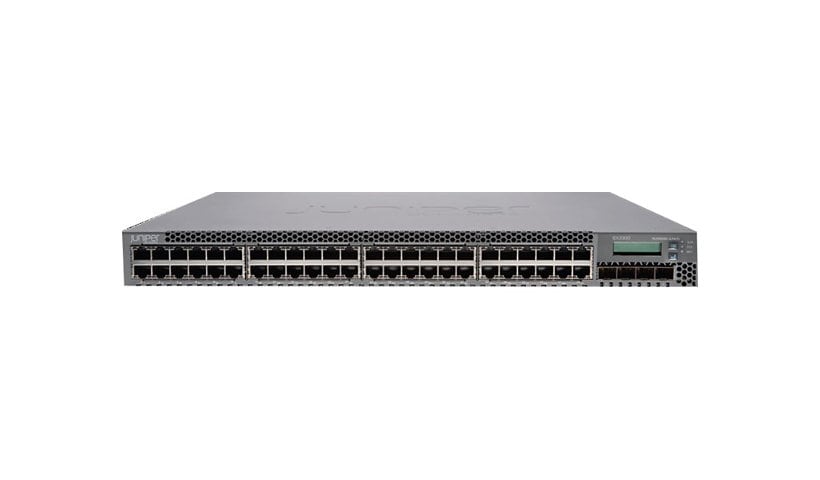
Juniper Networks EX3300 Ethernet Switches provide connectivity for low-density environments.
Power over Ethernet Plus Ports
Support for Virtual Chassis—EX3300 switches support Virtual Chassis technology. You can interconnect a maximum of 10 EX3300 switches to form a Virtual Chassis.
High flexibility—EX3300 switches provide a flexible solution that supports converged data, voice, and video environments.
Support for Power over Ethernet (PoE)—EX3300-24P and EX3300-48P models support the IEEE 802.3at PoE standard, also known as PoE+, delivering up to 30 watts of power per port to support networked devices such as telephones, video cameras, IEEE 802.11n wireless LAN (WLAN) access points, and video phones.
EX3300 switches provide:
Either 24 or 48 built-in network ports with 10/100/1000BASE-T Gigabit Ethernet connectors (ports labeled 0 through 23 or 0 through 47)
Four uplink ports (ports labeled 0 through 3)
Virtual Chassis capability—You can connect up to ten EX3300 switches together to form one unit that you manage as a single chassis, called a Virtual Chassis.
Power over Ethernet Plus (PoE+) on all network ports (in PoE+-capable models only)
Each EX3300 switch has four autosensing uplink ports. You can use the uplink ports on the switch to:
Connect an access switch to a distribution switch
Interconnect member switches of a Virtual Chassis
The uplink ports labeled 0 and 1 (interfaces ge-0/1/0 and ge-0/1/1 or xe-0/1/0 and xe-0/1/1) are configured by default as network ports. To use uplink ports 0 and 1 to interconnect Virtual Chassis members, you must configure them as Virtual Chassis ports (VCPs).
The uplink ports labeled 2 and 3 (interfaces ge-0/1/2 and ge-0/1/3 or xe-0/1/2 and xe-0/1/3) are configured by default as VCPs. You can use these uplink ports to interconnect Virtual Chassis members. To use uplink ports 2 and 3 as network ports, you must configure them as network ports.
The uplink ports support SFP and SFP+ transceivers. For a list of supported transceivers, see Pluggable Transceivers Supported on EX3300 Switches.
EX3300 switches are available in models with or without PoE+ capability. Models that support PoE+ provide that support on all network ports.
PoE+ ports provide electrical current to devices—such as IP phones, wireless access points, and security cameras—through network cables, thus eliminating the need for separate power cords for those devices.
Note
IEEE 802.3af and IEEE 802.3at powered devices require category 5 or higher Ethernet cables.
The EX3300 switch models are available:
With 24 or 48 network ports
With or without PoE+ capability
With front-to-back or back-to-front airflow
With AC or DC power supplies
Table 1 lists the EX3300 switch models.
Table 1: EX3300 Switch Models
| Model | Access Ports | Ports in Which PoE+ Is Available | Maximum System Power Available for PoE | Direction of Airflow | First Junos OS Release |
|---|---|---|---|---|---|
| EX3300-24T | 24 Gigabit Ethernet | – | – | Front-to-back | 11.3R1 |
| EX3300-24P | 24 Gigabit Ethernet | All 24 ports | 405 W | Front-to-back | 11.3R1 |
| EX3300-24T-DC | 24 Gigabit Ethernet | – | – | Front-to-back | 11.3R1 |
| EX3300-48T | 48 Gigabit Ethernet | – | – | Front-to-back | 11.3R1 |
| EX3300-48T-BF | 48 Gigabit Ethernet | – | – | Back-to-front | 11.3R1 |
| EX3300-48P | 48 Gigabit Ethernet | All 48 ports | 740 W | Front-to-back | 11.3R1 |
Note
In rare cases, EX3300 switches running a Junos OS release prior to Release 11.3R4 or Release 11.4R2 might experience some traffic loss or a link failure as a result of non-user-configurable settings that are not optimized. To resolve this issue, upgrade to one of the following Junos OS releases:
Junos OS Release 11.3—R4 and later
Junos OS Release 11.4—R2 and later
Junos OS Release 12.1—R1 and later
This topic describes the hardware terms used in EX3300 switch documentation and the corresponding terms used in the Junos OS command line interface (CLI). See Table 2.
Table 2: CLI Equivalents of Terms Used in Documentation for EX3300 Switches
| Hardware Item (Field as Displayed in CLI) | Description (Field as Displayed in CLI) | Value (Field as Displayed in CLI) | Item in Documentation | Additional Information |
|---|---|---|---|---|
| Chassis | One of the following: EX3300-24T EX3300-24P EX3300-24T-DC EX3300-48T EX3300-48T-BF EX3300-48P | – | Switch chassis | Chassis Physical Specifications for EX3300 Switches |
FPC (n)
| On EX3300 standalone switches: Abbreviated name of the Flexible PIC Concentrator (FPC) One of the following: EX3300-24T EX3300-24P EX3300-24T-DC EX3300-48T EX3300-48T-BF EX3300-48P | Value of n is always 0. | The switch does not have actual FPCs. In this case, FPC refers to the switch itself. | Understanding Interface Naming Conventions |
On EX3300 Virtual Chassis: Member ID of the switch within the Virtual Chassis | n is a value in the range of 0-9. | In this case, the FPC number refers to the member ID assigned to the switch. | Understanding Virtual Chassis Components | |
| PIC (n) | Abbreviated name of the Physical Interface Card (PIC) | n is a value in the range of 0–1. | The switch does not have actual PIC devices; see entries for PIC 0 through PIC 1 for the equivalent item on the switch. | Understanding Interface Naming Conventions |
One of the following: 24x 10/100/1000 BASE-T 48x 10/100/1000 BASE-T | PIC 0 | Built-in network ports on the front panel of the switch | Front Panel of an EX3300 Switch | |
| 4x GE/XE SFP+ | PIC 1 | Built-in uplink ports on the front panel of the switch | Front Panel of an EX3300 Switch | |
| Xcvr (n) | Abbreviated name of the transceiver | n is a value equivalent to the number of the port in which the transceiver is installed. | Optical transceivers | Pluggable Transceivers Supported on EX3300 Switches |
| Power Supply (n) | Built-in power supply | Value of n is always 0. | Power supply | Power Supply in EX3300 Switches |
| Fan Tray | Built-in fan tray | – | Fan tray | EX3300 Cooling System |
The EX3300 switch chassis is a rigid sheet-metal structure that houses the hardware components. Table 3 summarizes the physical specifications of the EX3300 switch chassis.
Table 3: Physical Specifications of the EX3300 Switch Chassis
| Description | Value |
|---|---|
| Chassis height | 1.75 in. (4.45 cm) |
| Chassis width | 17.5 in. (44.5 cm) 19 in. (48.2 cm) with mounting brackets attached |
| Chassis depth | 12 in. (30.5 cm) |
| Weight | EX3300-24T: 10 lb (4.6 kg) EX3300-24P: 11.6 lb (5.3 kg) EX3300-24T-DC: 9.8 lb (4.5 kg) EX3300-48T: 10.8 lb (4.9 kg) EX3300-48T-BF: 10.8 lb (4.9 kg) EX3300-48P: 12.8 lb (5.8 kg) |
Your rating of this product -

Verified
This is some content from a media component. You can replace this with any content and adjust it as needed.
Verified
This is some content from a media component. You can replace this with any content and adjust it as needed.
Verified
This is some content from a media component. You can replace this with any content and adjust it as needed.
To download flyer, brochure or specification of HP Pro One 400 G3 i3 None Touch All In One PC , click the on the buttons. (All documents are pdf format)
CATEGORIES
WINTER SALE

Get Update